
HunTracker · HelpPro
Drawing your association's district map
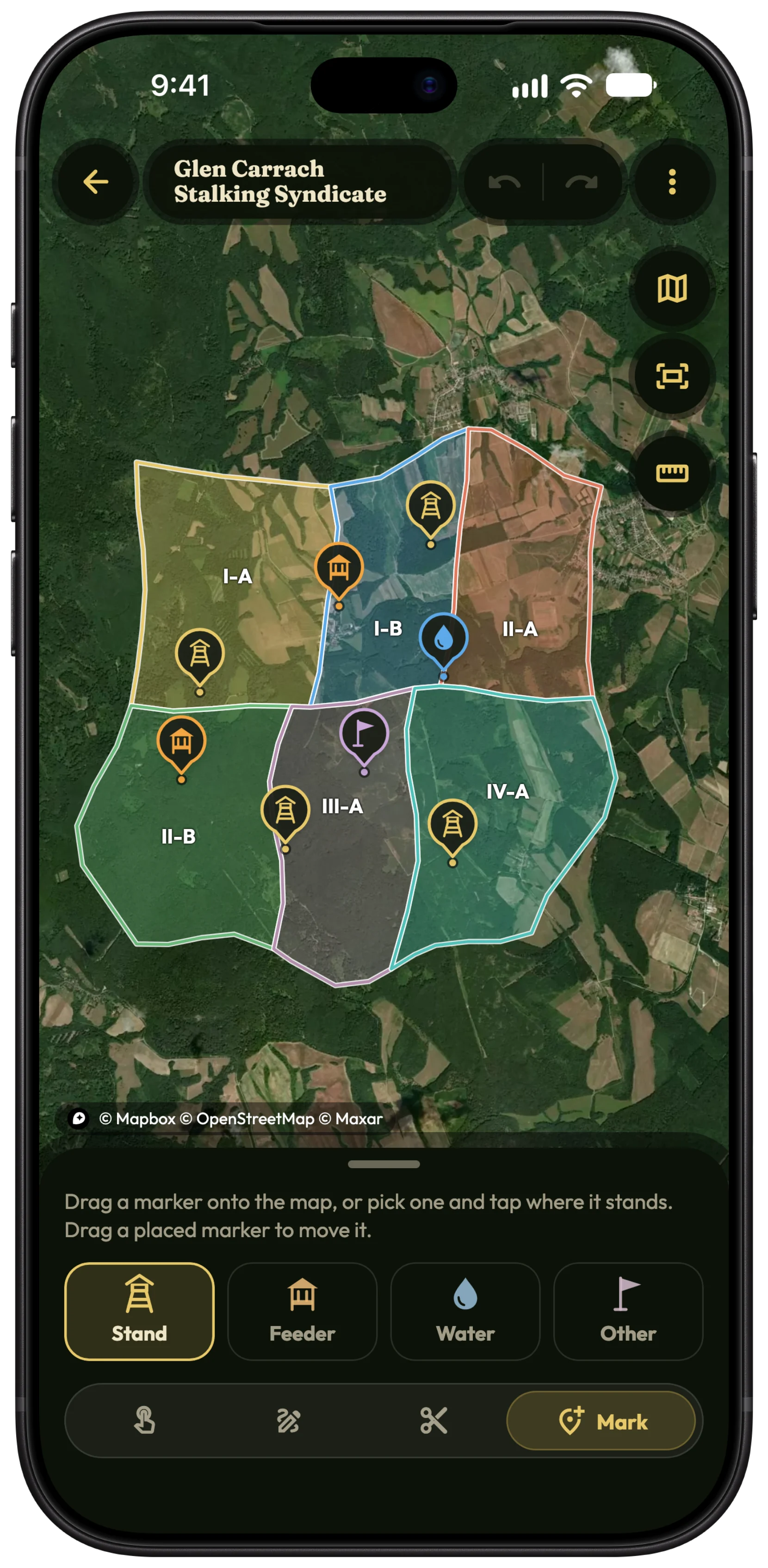
Trace the outer border once, cut it into districts so neighbours share their border exactly, and put the stands, feeders and waters where they stand. Every member then sees them on their hunt map.
Start the map
- Open Hunter › Hunting associations.
- On the association's card, tap District map.
- Choose Draw the border to trace it yourself, or Import a file if you already have it as KML, KMZ, GeoJSON or GPX.
Draw the border
- With Draw area selected, tap the map point by point around the border. Switch on Freehand to trace with your finger instead.
- Tap Close area when you are back at the start.
- Name the area: pick a district from the list or create a New district.
- To move a point later, use Select and drag it.
Tip On a computer, in the web app, you can click, drag and zoom with the mouse wheel, which makes long borders much quicker.
Cut it into districts
- Choose Cut and draw a line right across an area.
- Name each new piece after its district.
- Use Merge to join two areas, or Rename to change a name.
Tip Cutting rather than drawing each district separately means neighbouring districts share their border, with no gaps and no overlaps.
Mark stands, feeders and waters
- Choose Mark, then Stand, Feeder, Water or Other.
- Tap where it stands and give it a name.
- Drag a marker to move it.
- In the field, you can also add one where you are standing: on the hunt map, tap Tools › Add markers.
Fix overlapping borders
When an imported border runs into a neighbour, the shared ground turns red and Overlapping areas appears.
- Use Previous overlap and Next overlap to step from one to the next.
- Drag a border point out of the red until the overlap is gone.
Export or share it
Under More you can Export as KML or GeoJSON, markers included. Share the association with its members, and they always get your latest version: when a hunt starts inside a district, its district is filled in for them.
Free and Pro
Drawing and editing district maps, and seeing them on the hunt map, are part of Pro. Members can join a shared association for free and see its map with Pro. Compare Free and Pro →
Questions and answers
Can I import my hunting ground's border?
Yes: KML, KMZ, GeoJSON and GPX files, for example one exported from another mapping app. Waypoints come in as markers.
Who can change the map?
The leader and the editors, with Pro. Members see it read-only, marked View only.
Is the drawing an official boundary?
No. It is your own map for finding your way and keeping records straight. The legal boundaries are the ones the authorities hold.
Still stuck?
Write to us and say which phone and app version you use. A real hunter on the team answers, usually within a day.