

HunTracker · Map lighting
The map in its true light
Light decides how a hunt goes: when the first sun reaches the clearing, which slope stays in shadow, whether fog fills the valley at dawn. HunTracker lights the hunt map the way the sky lights the ground right now, from the real position of the sun and the moon and from the weather, so the map looks like the morning you are walking into.
Free to download · Free version with no time limit · No ads
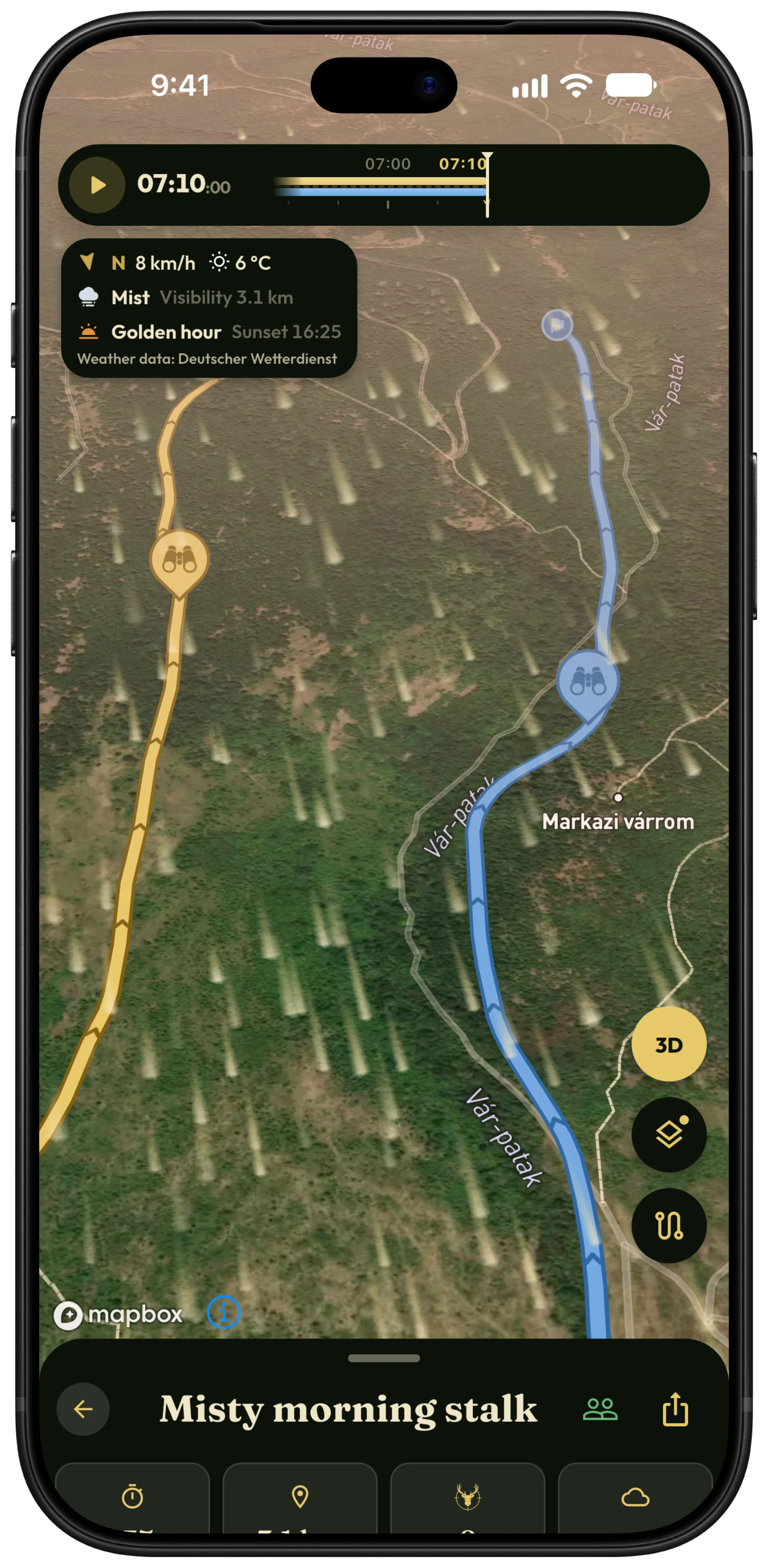
What lights the map
Sun and moon, where they really are
The light comes from the true position of the sun and the moon for the place and the minute, coloured the way the air colours it: warm and low at dawn and dusk, white at midday, cool and faint under the moon.
Golden hour, blue hour, moonlight
Rose-gold first light, amber evening sun and alpenglow on the high ground, then the blue hour and a night lit by the moon in its real phase.
Hills cast shadows
Ridges throw real shadows that lengthen as the sun sinks, and hollows and gullies sit darker, so you read the lie of the land at a glance.
The weather in the light
Cloud softens the light and the shadows; poor visibility and humid air bring haze toward the horizon. It follows the forecast for the part of the map you are looking at.
Fog in five levels
From mist to dense fog, by the forecast visibility. Fog settles into the low ground and the valleys, and its top catches the sun. It has its own switch under Tools › Overlays, which shows the current level and visibility.
Wind across the ground
Redesigned wind streaks drift over the map with the forecast wind and follow the terrain on the 3D map.
Every hunt in its own light
Replay a finished hunt and the map shows the light and the weather of that day, not today's.
Kind to the battery
The light changes slowly, so it updates without animating; in Low Power Mode (Battery Saver on Android) it updates less often and the wind streaks hold still.
How it works
- Open a hunt's map.
- The light follows the sun, the moon and the weather by itself: there is nothing to set up.
- Tap Tools, and under Overlays switch on Fog and Wind.
- Tilt the map to see the light and the shadows on the 3D terrain.
- Replay a finished hunt to see the light of that day.
Free and Pro
The lighting is free on every map. The fog overlay, the wind streaks and the full 3D look (terrain, sky and graded satellite imagery) are part of Pro. Compare Free and Pro →
Questions and answers
Is the light real, or just a filter?
It is computed: the position of the sun and the moon for your place and time, how much air the light passes through, the cloud, visibility and humidity from the forecast, and the shape of the ground for the shadows. It shows the conditions; it is not a photograph of them.
Does it work on the free map?
Yes. The lighting is free on the satellite map too. The 3D terrain with its sky, the fog overlay and the wind streaks are part of Pro.
Does it drain the battery?
Very little. The light changes slowly, so it updates without animating, and in Low Power Mode less often still, with the wind streaks stopped.
Where does the fog come from?
From the forecast visibility and humidity for the area on the map. The Fog row under Tools › Overlays shows the current level and visibility. It is a forecast, so trust your own eyes in the field.
Start this season's journal.
Free to download for iPhone and Android, with a free version that has no time limit.